MacDroid vs OpenMTP (and a third option)
OpenMTP is free, open source and copies both ways over USB. MacDroid adds ADB and Wi-Fi and charges for copying to the phone. For photos, there's a third.
October 6, 2026
Short answer: OpenMTP is free, open source, and copies in both directions over USB. MacDroid’s free version only copies from the phone to the Mac; PRO adds copying to the phone and editing phone files directly in Finder. MacDroid can also connect over ADB or Wi-Fi, and Wi-Fi is listed as a PRO feature. If what you are really moving is photos, neither is built for that — which is where the third option comes in.
What they have in common
Both are general file managers for Android on a Mac. Both talk MTP, the protocol an Android phone uses in File transfer mode, which macOS has never supported on its own. And both are popular for the same reason: Google discontinued Android File Transfer in 2024, and nothing in macOS replaced it.
Over USB, both need the phone in File transfer mode. Android starts in charging-only mode on most phones, so pull down the notification shade, tap the USB notification and choose it. If the Mac still sees nothing, the fixes are in Android File Transfer not working on Mac.
Where they differ
| OpenMTP | MacDroid | |
|---|---|---|
| Price | Free, open source (MIT) | Free version; PRO $19/year or $34 lifetime (shown as a sale from $49) |
| Phone → Mac | Yes | Yes, in the free version |
| Mac → phone | Yes | PRO |
| Files on the phone | Rename, delete, new folders: yes. Edit files in place: not supported. | Editing directly in Finder: PRO |
| Connection | USB (MTP) | MTP, ADB or Wi-Fi (Wi-Fi: listed as a PRO feature) |
Competitor prices and features checked October 6, 2026. MacDroid’s 1-year subscription is $19 a year with a 7-day trial; the lifetime license is $34, shown as a sale from $49 (macdroid.app).
OpenMTP is a two-pane browser: the phone’s folders on one side, the Mac’s on the other, and you drag between them. Its source is public under the MIT license, it ships a native Apple silicon build, and it lifts the 4 GB single-file limit that Android File Transfer had. On the phone it can copy, move, rename and delete files and create folders; it does not mount the phone in Finder or edit a file in place.
MacDroid is the one to look at if a cable is the problem. Its Wi-Fi and ADB modes are the main things OpenMTP does not offer, and Wi-Fi is listed as a PRO feature on MacDroid’s purchase page.
What neither of them is built for
Both are file managers, so photos are just files. In OpenMTP you open
DCIM/Camera and the WhatsApp folder by hand, see filenames rather than months,
and work out yourself which of 4,000 files you already copied last time. It does
not check that a copy matches the original or know which files are safe to
delete from the phone. MacDroid’s website does not list photos by month, copy
verification or a safe-delete step either.
*Based on MacDroid’s website as of October 6, 2026.
That is fine for moving a folder. It is the hard part when the phone is full and the next step is deleting.
The third option — RollFerry
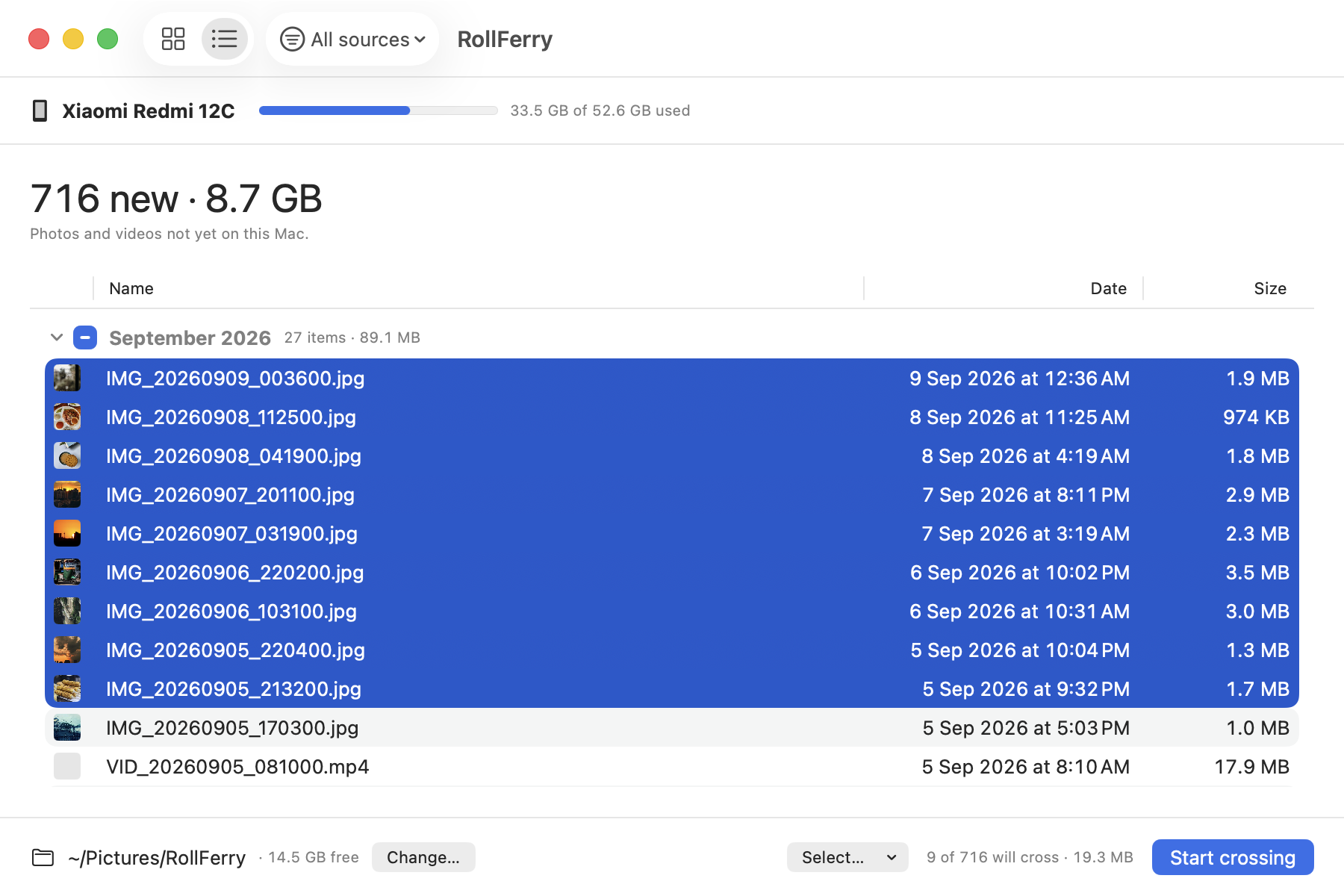
RollFerry is a Mac app for photos and videos only, phone to Mac, over a cable. It does not copy files to the phone or connect over Wi-Fi; what it does is the photo job, carefully.
- Plug in. It reads the camera folders, screenshots and, if you switch them on, Downloads and WhatsApp media. About five seconds for 700 items.
- See what is new. It remembers everything it has copied before, so the grid shows only what is not on your Mac yet, by month, with thumbnails. Pick a month, a range, or everything.
- Cross. Each file is copied and then checked byte for byte with SHA-256. A tick means it landed. Unplug halfway and you lose at most the file in flight.
Freeing space on the phone is a separate step you start yourself, and RollFerry only offers to delete what it has verified on your Mac. It is $15 once, for one Mac, with no account and no subscription.
Which to pick
- Free, both directions, over USB: OpenMTP.
- Wi-Fi or ADB: MacDroid.
- Camera roll only, nothing to install: Image Capture, the free tool already on your Mac — see Android File Transfer alternatives for Mac.
- Photos and videos, verified before you free space: RollFerry.
If you are mainly replacing MacDroid, the longer comparison is in MacDroid alternative for Mac. If WhatsApp is the bulk of it, see saving WhatsApp photos from Android to a Mac, and if the phone is simply full, phone storage full: move the photos to your Mac.
Questions
Is OpenMTP better than MacDroid?
For free two-way transfers over USB, yes: OpenMTP does that at no cost, while MacDroid charges for copying to the phone. MacDroid is the one to pick if you need Wi-Fi or ADB.
Is OpenMTP safe to use?
Its source code is public on GitHub under the MIT license, so anyone can read what it does. Download it from the project’s own site or its GitHub releases rather than a mirror.
Do I need either one just for photos?
No. Image Capture is free and built in for the camera roll. For WhatsApp media, months and verified copies before deleting, RollFerry is made for exactly that job.