MacDroid alternative for Mac
MacDroid's free version copies one way; PRO is $19 a year or $34 lifetime. Here are the free alternatives, and a one-time option made for photos.
October 6, 2026
Short answer: for a free MacDroid alternative that handles any kind of file, use OpenMTP — it is open source and copies in both directions. If what you actually move is photos and videos, Image Capture is free and built in for the camera roll, and RollFerry ($15 once) adds months, WhatsApp media and a verified copy of every file.
What MacDroid is, and what it costs
MacDroid is a file manager for Android phones on a Mac. It connects three ways — MTP over USB, ADB, or Wi-Fi — and comes in two versions. The free one copies files from the phone to the Mac only. Copying files to the phone, and editing the phone’s files directly in Finder, need MacDroid PRO, and Wi-Fi is listed among the PRO features.
PRO is sold as a 1-year subscription at $19 a year, with a 7-day trial, or as a lifetime license at $34, shown as a sale from $49. Those are the prices on MacDroid’s purchase page as of October 6, 2026, before any local tax.
That is a fair price for a general tool. People look elsewhere for one of three reasons: they only want photos off the phone and would rather not subscribe for that; they want something free and open source; or they want to know, before deleting anything from the phone, that every copy is intact.
Option 1 — Image Capture (free, built in)
Every Mac has Image Capture in Applications → Utilities. Set the phone’s USB mode to PTP — some phones call it Transferring images or Camera (PTP) — and the Mac sees it as a camera.
Good: free, nothing to install, copies photos and videos from the camera roll.
Limits: PTP only exposes the camera folder, so WhatsApp media, screenshots and downloads are invisible — WhatsApp needs a different route, covered in saving WhatsApp photos from Android to a Mac. Image Capture shows one flat list with no months, keeps no record of what it imported last time, does not verify its copies, and its “Delete after import” removes originals without checking the copy.
Option 2 — OpenMTP (free, open source)
OpenMTP is the closest free match for what MacDroid does: a two-pane file browser for Android over MTP, MIT-licensed, with a native Apple silicon build. It copies in both directions and lifts the 4 GB single-file limit that Android File Transfer had. On the phone it can rename and delete files and create folders, but it cannot open and edit a file in place.
Good: free, open source, and sees every folder on the phone, WhatsApp included.
Limits: it is a file manager, not a photo tool. You see filenames rather than months, there is no notion of what you already copied last time, and there is no verification and no safe delete.
The two are compared head to head in MacDroid vs OpenMTP.
Option 3 — RollFerry (one-time, made for photos)
RollFerry is a Mac app for one job: photos and videos off an Android phone and onto your Mac or an external drive, over a cable. It does not replace MacDroid for everything — it does not copy files to the phone, browse arbitrary folders or work over Wi-Fi. If photos are what you move, it does that job more carefully than a file manager.
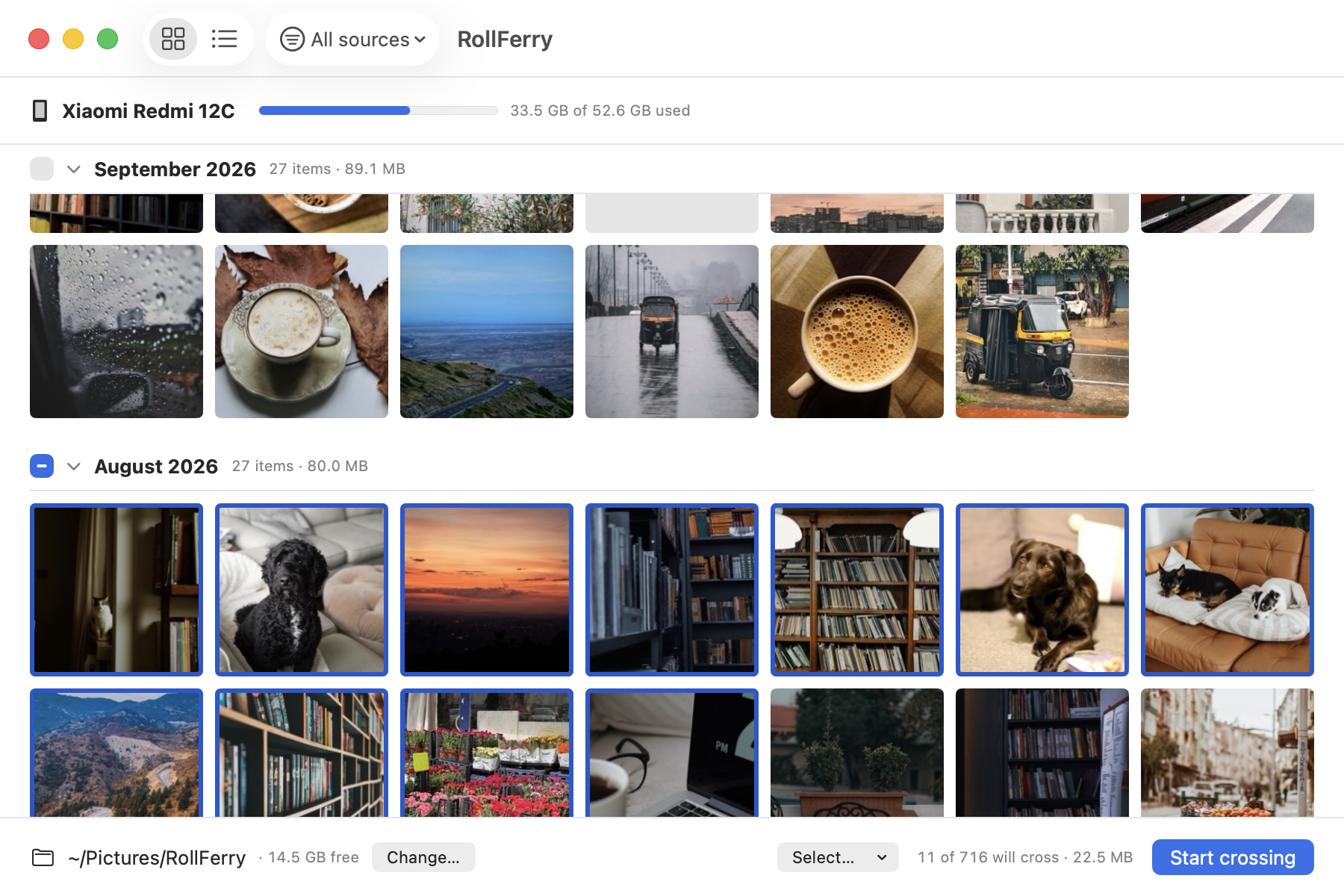
- Plug in with the phone in File transfer mode. RollFerry reads it — about five seconds for 700 photos.
- See what is new. Only what is not on your Mac yet, by month, with thumbnails. Filter to Camera, Screenshots or WhatsApp, then pick a month, a range, or everything.
- Cross. Each file is copied, then checked byte for byte with SHA-256. Unplug halfway and it picks up where it stopped.
Freeing space on the phone is a separate step, and RollFerry only offers to delete files it has verified on your Mac — the safe order for moving photos off a full phone. It is $15 once, for one Mac, with no account, and the trial scans and browses without limit.
Side by side
| Image Capture | OpenMTP | MacDroid | RollFerry | |
|---|---|---|---|---|
| Price | Free, built in | Free, open source | Free version; PRO $19/year or $34 lifetime (shown as a sale from $49) | $15 once |
| Phone → Mac | Camera folder only | Any folder | Yes, in the free version | Photos and videos |
| Mac → phone | No | Yes | PRO | No |
| Connection | USB (PTP) | USB (MTP) | MTP, ADB or Wi-Fi (Wi-Fi: listed as a PRO feature) | USB (MTP) |
| Photos by month, only what’s new | No | No | Not listed* | Yes |
| Verifies every copy | No | No | Not listed* | Yes, SHA-256 |
| Deletes from the phone only after verifying | No | No | Not listed* | Yes |
Competitor prices and features checked October 6, 2026. *Based on MacDroid’s website as of October 6, 2026.
Which one should you use?
- Files of any kind, both ways, free: OpenMTP.
- Wi-Fi, or editing files on the phone from the Mac: MacDroid PRO.
- A few hundred camera photos, nothing to install: Image Capture.
- Photos and videos, WhatsApp included, verified before you free space: RollFerry.
Whichever you pick, the phone has to be in the right USB mode first. If the Mac does not see it at all, work through Android File Transfer not working on Mac. If you are coming from Google’s old app rather than from MacDroid, Android File Transfer alternatives for Mac covers the same ground.
Questions
Is there a free alternative to MacDroid?
Yes. OpenMTP is free and open source and does most of what MacDroid does over USB, including copying in both directions. For camera-roll photos only, the Mac’s built-in Image Capture is free too.
Is MacDroid a subscription?
MacDroid PRO is sold either as a subscription at $19 a year or as a $34 lifetime license, as of October 6, 2026. The free version copies from the phone to the Mac without paying anything.
Does RollFerry replace MacDroid?
Only for photos and videos. RollFerry copies them from an Android phone to a Mac or a drive and verifies each one, but it does not copy files to the phone, manage other folders or connect over Wi-Fi.